When I was in high school, I worked as a casual attendant at a children's indoor play centre. As a software engineer, it became an instinct to recognise and propose fixes on the design flaws and systematic inefficiencies around me.
The most critical inefficiency was the online safety waiver. Since it's a mandatory legal document, all visitors are required to sign the waiver prior to entry, yet it was a source of constant friction:
- Slow Process: Walk-in customers typically took ~5 minutes to sign the waiver, causing congestion and long waits at the reception during peak hours.
- Incomplete Waiver: Guardians sometimes submitted waivers without adding their children. The action of adding child details was easily missed due to the lengthy form, an inconspicuous button, and a lack of input validation. This contradicts the POS system, which requires every ticket to be linked to a child and waiver. Consequently, guardians must resubmit the waiver and add their children, costing time and customer experience.
- The Policy Gap: The waiver was a wall of text. Users naturally scrolled to the bottom and ticked agree without reading the rules and policies. This led to friction inside the venue when customers were surprised to learn of certain safety rules and policies.
Therefore, I built a waiver system to solve these specific operational failures.
Project Scope
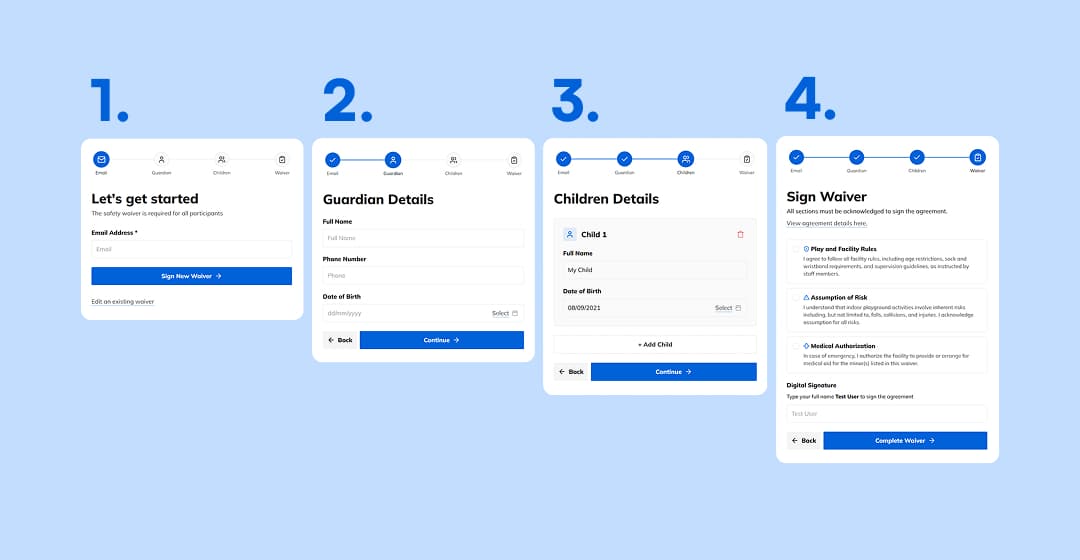
The primary goal was to create a frictionless onboarding experience that was secure and fast. The system needed to ensure that no waiver could be submitted without at least one child, and that safety policies were actually seen by the user. I also wanted to build an admin dashboard for efficient waiver lookups, which was commonly used in-venue.
The Primary Objectives
- Eliminate Friction: Create a smooth onboarding flow that is intuitive and efficient. The waiver should be completable in 2 minutes.
- Guarantee Data Integrity: Ensure no waiver is submitted with partial information. All waivers must have a guardian, at least one child, and a valid policy agreement.
- Communicate Policies: Clearly communicate policies and safety rules on the waiver to avoid confusion in-venue.
- Modernise the Admin Experience: Develop a high-performance dashboard that makes waiver searches effortless and accessible.
The Engineering Challenges
- Speed and Optimisation: Keep the application fast for users and admins, whilst being capable of high traffic volumes.
- Stateful Form Persistence: Build a waiver application with a draft and edit function. Auto-saving information allows users to resume progress and returning customers to update their existing waiver.
- Server-side Guarding: Ensure that the server secures all routes and server actions so that the legal agreement data is immutable once submitted.
Tech Stack Overview
- Core: Next.js 15 + TypeScript
- Database: PostgreSQL via Neon Serverless
- ORM: Prisma
- Validation: Zod, single source of truth across the frontend and backend
- UI/UX: Tailwind CSS, shadcn, Lucide Icons
Design Decisions
Onboarding Flow
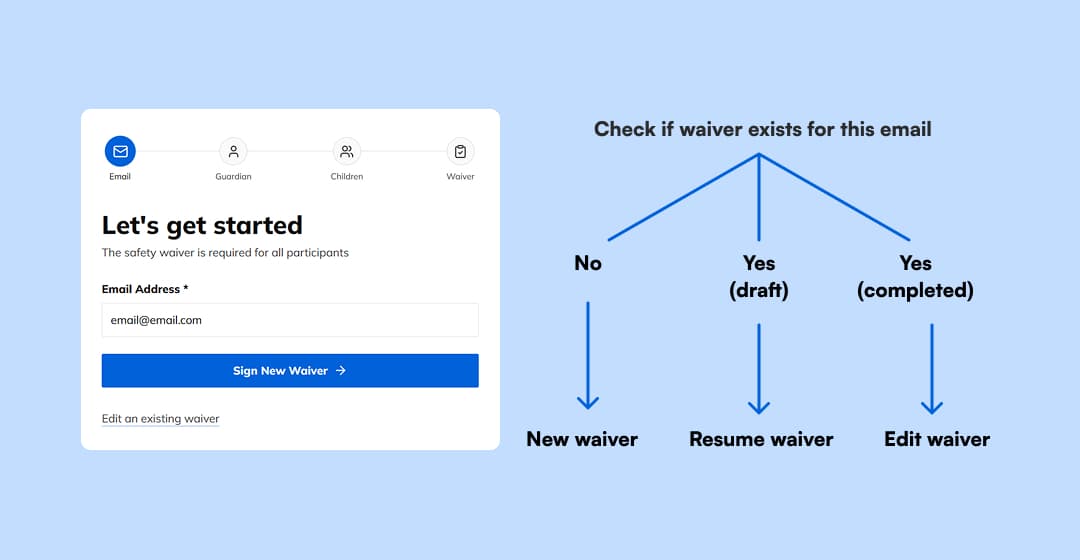
The existing system forces users to choose: "Are you new or returning?" This is a decision point that introduces extra friction. My system replaces this with an email lookup.
When a user enters their email, the backend performs an immediate check. If a completed waiver exists, the system pivots into the Edit Waiver workflow, allowing the parent to manage the signed children. If an incomplete waiver is found, the waiver initiates the Resume Waiver workflow and pre-populates the saved progress. If no waiver is found, it transitions into the New Waiver workflow. This removes a step from the user's journey while ensuring that returning customers don't create duplicate, fragmented records.
Note: This approach assumes the waiver is valid for returning customers.
Multi-Step Form
I intentionally dropped the single form layout in favour of a four-step form:
- Guardian Info
- Child Info
- Waiver Agreement
By chunking the form into manageable steps, I reduced the cognitive load on the user. More importantly, this structure allowed me to enforce specific constraints. For example, the system will not allow a user to proceed to the legal agreement until at least one child is added. This programmatic gate provides error feedback on each step, making the waiver process faster and easier to follow.
Policy and Rules Agreement
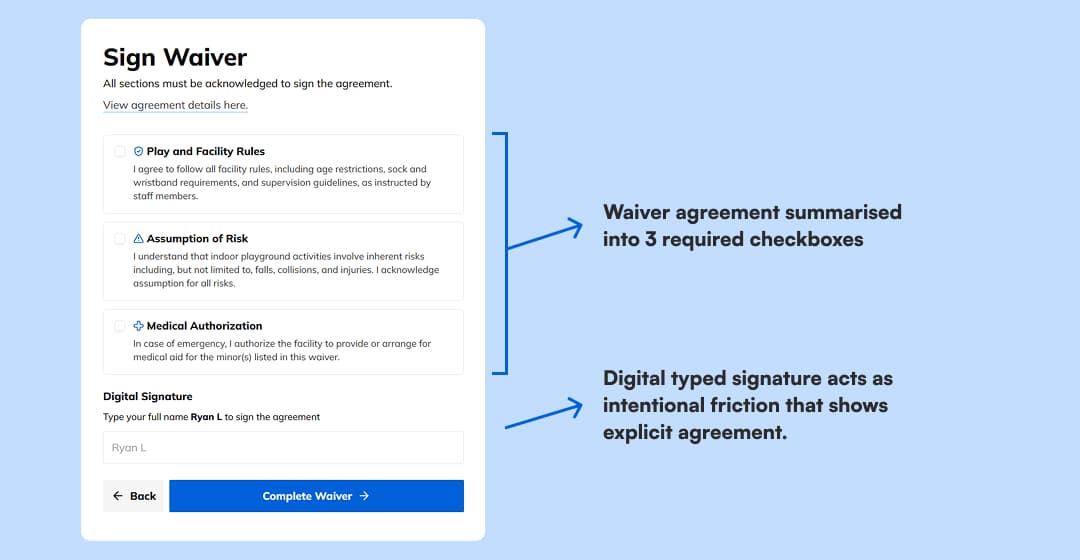
The final step prioritizes clarity by replacing walls of text with a streamlined interface. While the previous system forced users to scroll through lengthy policies, the new design breaks the legal agreement into concise individual checkboxes. This requires explicit agreement with each section along with a digital signature, providing a transparent solution that minimises legal risk and ensures users truly understand the safety policies.
Backend Engineering
Relational Data
For the database, I used Prisma to enforce relational constraints with PostgreSQL.
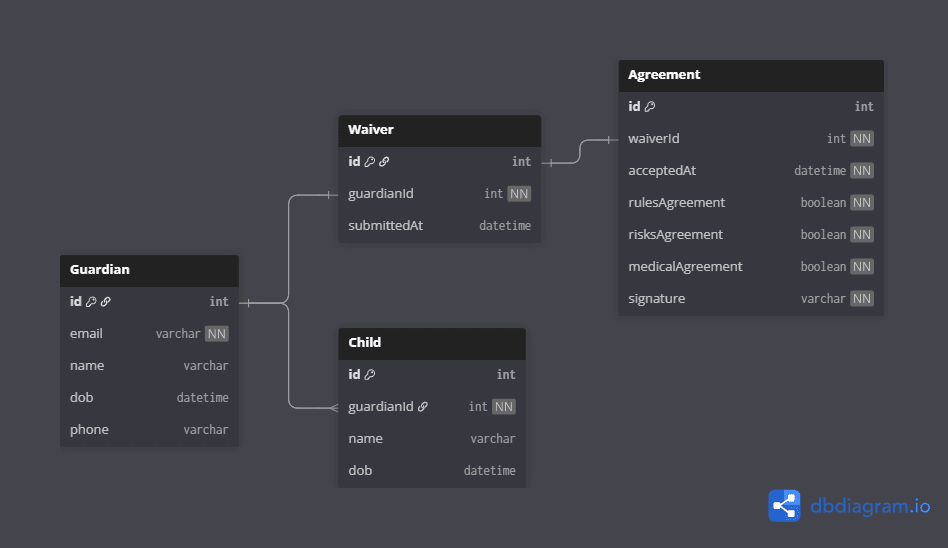
Because safety waivers are legally sensitive documents, the application must maintain data integrity between Guardian, Child, and Agreement records. By using Prisma, I ensured these relationships are enforced directly at the schema level, guaranteeing that every waiver is valid, complete, and admissible.
Guardian
├── Child (1-to-many)
└── Waiver (1-to-1)
      └── Agreement (1-to-1)
Note: Fields that store user input are nullable to support autosaving at each step of the waiver process. Incomplete steps will not contain values, so nulls must be expected in the database.
Zod Validation
To maintain a high standard of data quality, I implemented a unified validation layer, acting as a single source of truth. Using Zod, I created schemas that are shared between the client and the server.
This schema-first approach serves two distinct purposes:
- Client-Side: On the frontend, Zod provides instantaneous feedback. This is crucial for user experience; users don't have to wait for a server round-trip to identify issues. By catching errors on the client, we reduce user frustration and speed up the submission process.
- Server-Side: The backend uses the exact same schema in the server actions to parse every incoming request. Zod automatically strips away any unknown or malicious fields that a user might try to inject and ensures that invalid data never reaches database.
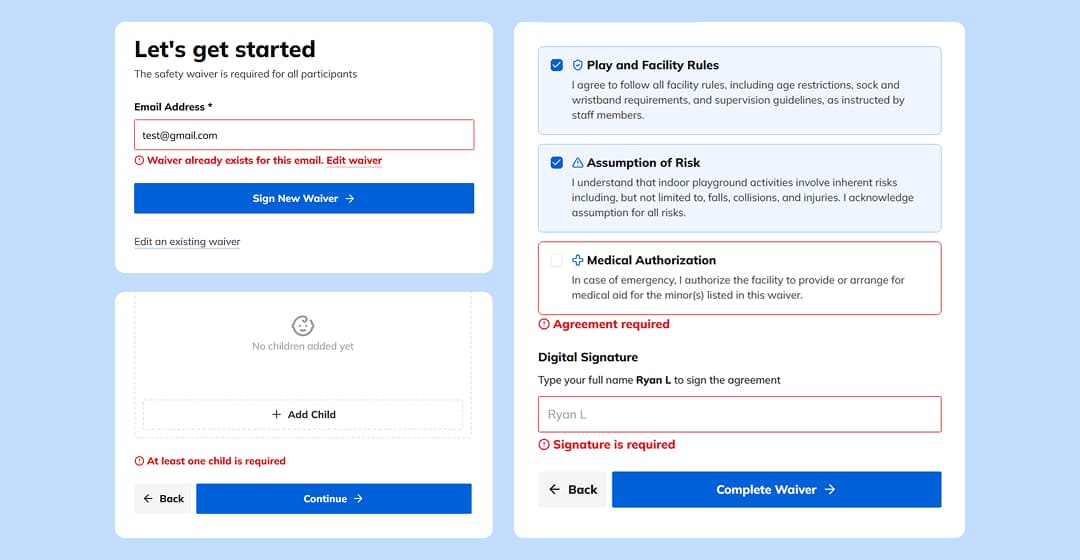
I moved away from error codes in favour of human-readable, guiding messages that directly address the lack of user feedback. These are displayed through custom field labels that provide real-time instructions:
- Waiver already exists for this email: This identifies existing waivers and prompts users to the update flow.
- At least one child is required: This programmatic constraint prevents child-less waivers that contradicts the POS waiver requirements.
- Agreement/signature required: This constraint requires the user to directly acknowledge the policies and safety rules.
State Management
The application's logic is determined by the submittedAt field in the Waiver table. By treating this timestamp as a state trigger, the backend dynamically manages three distinct actions:
- Starting a new waiver
- Resuming a draft waiver
- Updating a complete waiver
Based on the submittedAt field, the waiver has two states:
- Draft State: This state is the default that is triggered when a new waiver is started. To prevent data loss, the application automatically saves the fields on each form step. If the
submittedAtfield isnull, the waiver is classified as a draft. This allows for users to seamlessly resume editing an incomplete waiver, simply by re-entering their email. - Completed State: Once the waiver is signed and submitted, the backend applies a timestamp to
submittedAtfield. From this point forward, the server-side enforcement keeps the legal agreement immutable. However, the system intentionally allows for future modifications to the Children section without requiring the guardian to re-sign the entire document.
Note: While adding a state column might make the code more readable at a glance, it creates a functional dependency on the
submittedAtfield. That is,submittedAt = nullalways equal draft andsubmittedAt = Date()always equals completion. Since there will be no scenarios where these values would conflict, I chose to derive the state from the timestamp to keep the database and backend simple.
Server-side Guarding
To ensure users follow the intended waiver workflow, I implemented server-side guarding. Since the form is split into three distinct steps, the backend must prevent faulty and non-sequential submissions.
For instance, a user should not be able to submit a signed agreement (Step 4) if the guardian information (Step 2) is incomplete or invalid. The server-side logic fetches the current state of the Waiver from the database and verifies that the prerequisites for the current action have been met. If a user attempts to skip to the final submission via a direct script or API call, the server identifies the missing preceding data and rejects the request. Therefore, this enforcement requires all waiver steps to be valid and completed before submission.
Upon completion, the server-side guarding protects the signed waiver agreements from modification. Once the submittedAt timestamp is applied to a waiver, indicating completion, the backend locks the Agreement and Guardian records linked to that waiver.
I implemented a guard clause within the update actions that checks the submittedAt status. If a waiver is already marked as complete, the server strictly denies any further edit requests directed at the agreement terms or guardian details. This ensures that the version of the policy the parent agreed to remains preserved for legal audit, while still allowing the server to accept new Child entries without needing to re-sign the agreement.
Admin Dashboard
The administrative interface was engineered for workflow efficiency and performance. In a high-traffic venue, staff do not have the luxury of navigating through deep menus and waiting for data; they need to quickly locate, verify, and process data in seconds. To achieve this, I worked on admin UX tools and performance engineering.
Admin UX Tools
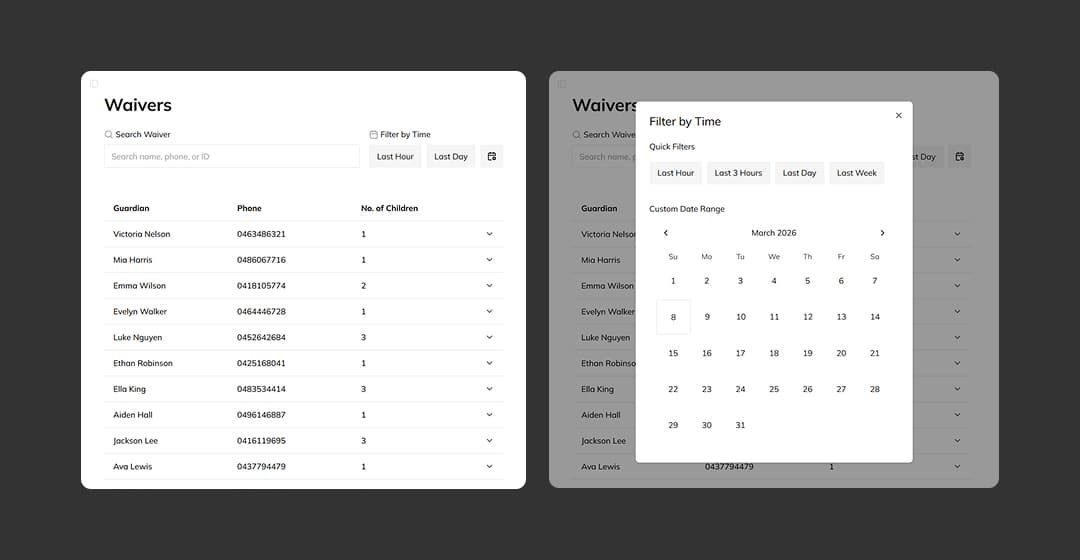
- URL-Driven Search and Filtering:
The dashboard features a dual-purpose search engine capable of handling guardian name, phone, and waiver ID searches. Beyond simple search, I integrated custom date filtering that allows staff to isolate waivers signed within specific days or hours. Crucially, I synchronized these filters with the URL state. This architectural choice means that every filtered view is a unique, shareable link. An admin can filter for "All incomplete waivers from today," refresh the page, or send that exact link to a colleague, and the search state remains perfectly preserved.
- Expandable Rows:
One of the primary UX challenges was balancing information density with visual clarity. The solution was an accordion-inspired table row architecture. The Condensed View displays the high-level metadata in a clean, scannable row. This allows staff to scroll through hundreds of entries without visual fatigue. Upon expansion, the row displays nested
Child,AgreementandWaiverdata, along with quick actions.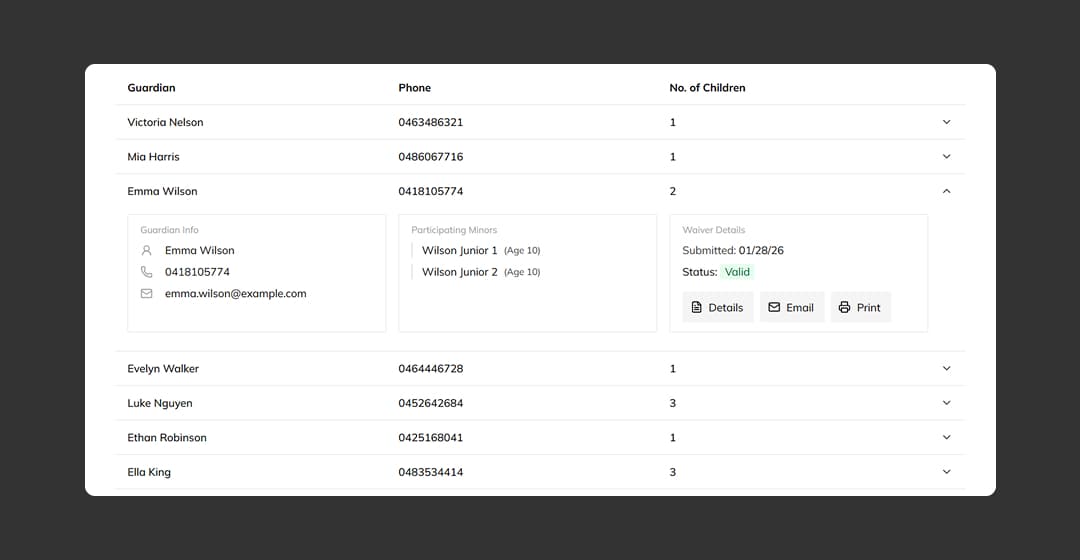
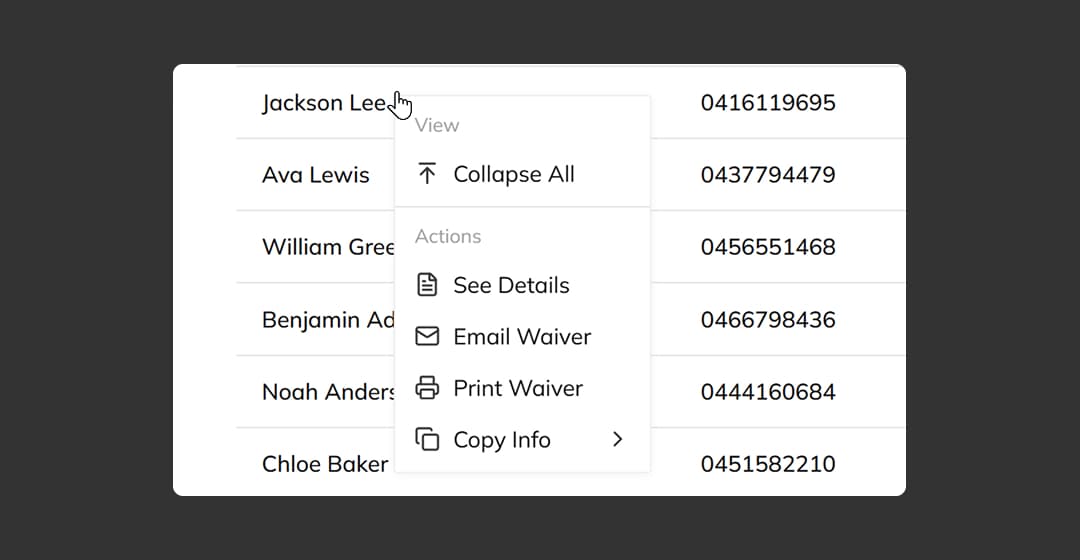
- Context Menu:
To further speed up common tasks, I implemented a right-click context menu using shadcn. For power users, this transforms the dashboard into a desktop-like application. From any row, a staff member can instantly trigger actions like "Collapse All," "Email Waiver" or "Copy Info" without having to navigate to that individual waiver.
Performance
Perceived Latency
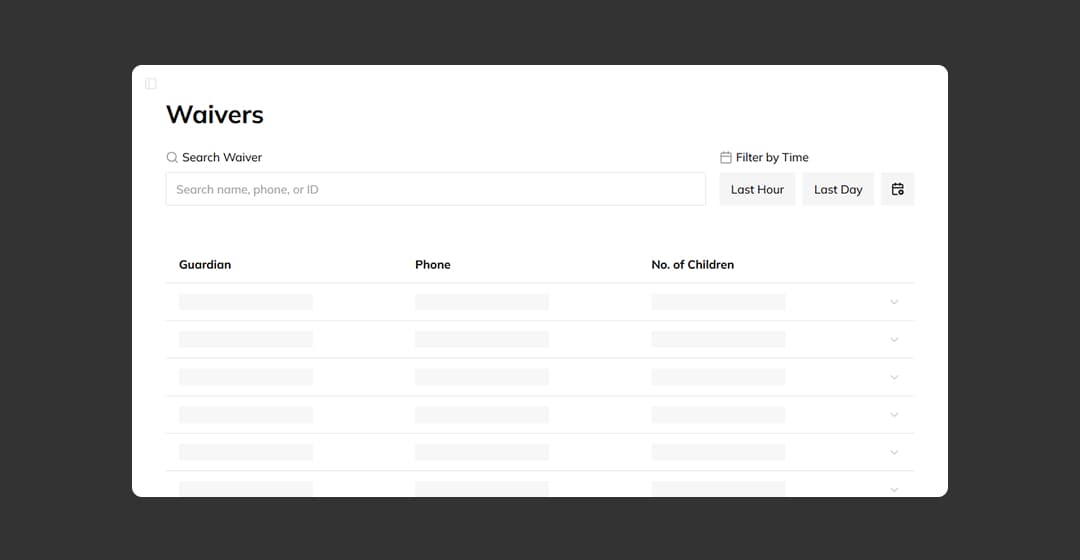
To make the app feel fast and responsive, I leveraged React Suspense and Skeleton Loaders. By using skeleton loaders while the waiver results loaded, the user receives immediate visual feedback that the app is working compared to a full screen loader, reducing the perceived wait time. Even if the database takes 200ms to respond, the user sees the dashboard layout almost instantly.
<Separator />
   <Suspense key={listKey} fallback={<WaiverSkeleton />}>
   <WaiverList params={params} />
</Suspense>
Optimisation
To handle the real latency, I focused on reducing the workload on database PostgreSQL through several key database techniques:
-
B-Tree Indexing: Administrative searches are inherently read-heavy. Without optimization, searching for a name or ID requires the entire table to be searched. I implemented PostgreSQL’s B-Tree indexes on the
name,phone,waiverID, andsubmittedAtcolumns, used for searching and filtering results. This allows the database to locate specific records significantly faster than searching the entire table, especially useful for larger datasets. -
Keyset Pagination: Fetching thousands of records at once is a common performance killer. I implemented a pagination system that controls the initial data load to ≤ 20 records per page. This significantly reduces the total transaction load that causes performance limitations on the server and client.
Waiver Results Pagination const pageSize = 20; const skip = filters?.page ? (Math.max(filters.page, 1) - 1) * pageSize : 0; const [waivers, totalCount] = await Promise.all([ db.waiver.findMany({ where, take: pageSize, skip, include: { guardian: { include: { children: true } }, agreement: true, }, orderBy: { submittedAt: "desc" }, }), db.waiver.count({ where }), ]); -
Debounced Input Logic: To prevent the server from being hammered with search requests, I implemented a 400ms debounce on the search inputs, which I found was a good balance. This guides database queries to trigger once the user has finished typing, preserving server resources.
Key Takeaways
This project served as a definitive turning point in my learnings, marking the transition from writing code to engineering real-world systems. By revisiting the design flaws and systematic problems I noticed in the venue through a technical lens, I was able to bridge the gap between software design and real-world solutions.
Synthesizing Real-World Constraints
By observing the physical friction of a playground reception - the queues, the data mismatches, and the safety policy confusion - I learned to build system constraints that solve human errors before they ever reach the database. This project taught me that effective engineering is about identifying the point-of-failure in a process and making it impossible to bypass. For instance, rather than relying on staff to manually check if children were added, I engineered a logic gate that prevents the waiver from progressing to the legal agreement until the child record count is valid and greater than zero. This shifted the responsibility of data integrity from a stressed receptionist to a hardened system constraint.
Performance as a Functional Requirement
I moved beyond treating performance as an afterthought or a "nice-to-have." Through the challenges in administrative data, I learned that performance is a core functional requirement. My work on performance engineering wasn't just about shaving off milliseconds; it was about ensuring that the application could keep up with the high-intensity environment it was designed for.
Final Reflection
Ultimately, this project reinforced a lead-engineer mindset: identifying issues, analysing the root cause, and architecting a robust, scalable solution. I have developed a tool that not only digitises a waiver process but actively improves the operational flow, legal safety, and customer experience of a business. Thus, my learnings from this project are the most rewarding I’ve achieved yet.